
ការប្រើកាតជាក់ស្តែង
បង់ថ្លៃ Netflix, ChatGPT និង App Store ដោយកាតនិម្មិត៖ ភ្ជាប់ បន្តជាវ ការបដិសេធ និងការប្តូរកាត
គ្រប់គ្រងការជាវតាមគេហទំព័រ Netflix, គេហទំព័រ ChatGPT, App Store និង Google Play ដាច់ពីគ្នា ដើម្បីភ្ជាប់កាត គណនាថ្លៃពិត ដោះស្រាយពេលកាតត្រូវបដិសេធ ប្តូរកាតដោយមិនធ្វើឱ្យសេវាដាច់ និងបោះបង់ការបន្តជាវឱ្យបានពិត។
កាតនិម្មិតមានលេខ Visa ឬ Mastercard ក៏ពិតមែន ប៉ុន្តែវាមិនធានាថា Netflix, ChatGPT, App Store ឬ Google Play នឹងទទួលនោះទេ។ ហាងអាចពិនិត្យប្រទេសដែលសេវាមាន តំបន់របស់គណនី ប្រទេសដែលចេញកាត អាសយដ្ឋានវិក្កយបត្រ ការផ្ទៀងផ្ទាត់ 3D Secure ការអនុញ្ញាតឱ្យកាត់ប្រាក់ដដែលៗ និងសញ្ញាហានិភ័យនៃប្រតិបត្តិការនោះ។
អត្ថបទនេះសម្រាប់អ្នកដែលប្រើកាតនិម្មិតគ្រប់គ្រងការជាវលើអ៊ីនធឺណិត ហើយត្រូវបានផ្ទៀងផ្ទាត់នៅ ថ្ងៃទី 24 សីហា 2026។ ក្រោយពីអាន អ្នកគួរតែដឹងថានរណាជាអ្នកគិតប្រាក់ពិត ចេះភ្ជាប់កាតលើកដំបូង រកមូលហេតុពេលប្រតិបត្តិការត្រូវបដិសេធ ប្តូរកាតដោយមិនធ្វើឱ្យសេវាដាច់ និងបោះបង់ការជាវឱ្យបានពិតប្រាកដ។ វិធីទូទាត់ រូបិយប័ណ្ណ និងរូបរាងអេក្រង់អាចប្តូរ សូមយកទំព័រវិក្កយបត្រផ្លូវការនិងការអនុញ្ញាតរបស់អ្នកចេញកាតជាចម្លើយចុងក្រោយ។
មុនបញ្ចូលលេខកាត ត្រូវដឹងថាបង់តាមច្រកណា
| កន្លែងទិញ | អ្នកគិតប្រាក់ពិត | កន្លែងប្តូរវិធីទូទាត់ | កន្លែងបោះបង់ |
|---|---|---|---|
| គេហទំព័រ Netflix | Netflix ឬដៃគូទូទាត់ក្នុងស្រុក | គណនី Netflix ផ្នែកគ្រប់គ្រងព័ត៌មានទូទាត់ | គណនី Netflix ផ្នែកបោះបង់សមាជិកភាព |
| គេហទំព័រ ChatGPT | ប្រព័ន្ធវិក្កយបត្ររបស់ OpenAI | ការកំណត់ ChatGPT ផ្នែកវិក្កយបត្រនិងការទូទាត់ | ការកំណត់ ផ្នែកវិក្កយបត្រ រួចបោះបង់កញ្ចប់ |
| ជាវក្នុងកម្មវិធីលើ iPhone ឬ iPad | Apple App Store | ការកំណត់ការទូទាត់និងការជាវនៃគណនី Apple | ការកំណត់ គណនី Apple ផ្នែកការជាវ |
| ជាវក្នុងកម្មវិធីលើ Android | Google Play | វិធីទូទាត់ឬការគ្រប់គ្រងការជាវក្នុង Play | Play Store ផ្នែកការទូទាត់និងការជាវ |
| កញ្ចប់រួមពីក្រុមហ៊ុនទូរគមនាគមន៍ឬអ៊ីនធឺណិត | ដៃគូនោះ | មជ្ឈមណ្ឌលវិក្កយបត្ររបស់ដៃគូ | មជ្ឈមណ្ឌលវិក្កយបត្ររបស់ដៃគូ |
បើរកការជាវមិនឃើញ កុំទិញម្តងទៀតភ្លាម។ សូមមើលបង្កាន់ដៃដើម ឈ្មោះហាងដែលបង្ហាញលើប្រតិបត្តិការកាត និងគណនីសេវា ដើម្បីដឹងថាអ្នកបានទិញតាមច្រកណា។ ការជាវតាមគេហទំព័រ តាម iOS និងតាម Android អាចក្លាយជាការគិតប្រាក់ដាច់ដោយឡែកពីគ្នា។
10 ចំណុចត្រូវពិនិត្យមុនភ្ជាប់កាត
- ប្រទេសរបស់សេវា៖ ទីតាំងពិតរបស់អ្នកត្រូវស្ថិតក្នុងប្រទេសដែលសេវាគាំទ្រ។
- តំបន់របស់គណនី៖ តំបន់នៃគណនី Netflix, Apple, Google ឬ ChatGPT ត្រូវនឹងព័ត៌មានពិត។
- ប្រទេសចេញកាត៖ ហាងខ្លះទាមទារកាតដែលចេញពីប្រទេសដែលគេគាំទ្រ។
- អាសយដ្ឋានវិក្កយបត្រ៖ បំពេញឈ្មោះ ផ្លូវ និងលេខកូដប្រៃសណីយ៍តាមកំណត់ត្រារបស់អ្នកចេញកាត។ កុំក្លែងបន្លំដើម្បីទទួលតម្លៃតំបន់ផ្សេង។
- មុខងាររបស់កាត៖ ត្រូវបើកការទូទាត់អនឡាញ អន្តរជាតិ ការកាត់ដដែលៗ និងការផ្ទៀងផ្ទាត់ 3DS។
- រូបិយប័ណ្ណ៖ ត្រូវដឹងរូបិយប័ណ្ណរបស់ហាង រូបិយប័ណ្ណលំនាំដើមរបស់កាត និងផ្លូវបម្លែង។
- សមតុល្យដែលមាន៖ ទុកចន្លោះសម្រាប់ពន្ធ អត្រាប្តូរប្រាក់ និងការអនុញ្ញាតផ្ទៀងផ្ទាត់។
- ថ្ងៃបន្តជាវ៖ កត់តំបន់ម៉ោង ថ្ងៃបញ្ចប់ការសាកល្បង និងថ្ងៃគិតប្រាក់បន្ទាប់។
- ផ្លូវសងប្រាក់វិញ៖ ដឹងថាប្រាក់ត្រឡប់ទៅកាតដើម សមតុល្យវេទិកា ឬដៃគូ ហើយចំណាយពេលប៉ុន្មានតាមលក្ខខណ្ឌ។
- ផ្លូវទូទាត់បម្រុង៖ សេវាសំខាន់ៗគួរមានជម្រើសបម្រុងស្របច្បាប់មួយ។
បើវេទិកាកាតកាត់ប្រាក់ពី USDT ឬគ្រីបតូ អ្នកត្រូវរាប់គម្លាតតម្លៃពេលទិញ ថ្លៃបញ្ចូលទុន ថ្លៃបម្លែង និងអត្រាប្តូរប្រាក់ផង មិនមែនត្រឹមតម្លៃកញ្ចប់ជាវទេ។
តារាងកត់ត្រាការជាវ
| ចំណុច | របៀបកត់ | ហេតុអ្វីត្រូវកត់ |
|---|---|---|
| សេវានិងកញ្ចប់ | ឧទាហរណ៍ Netflix ឬកញ្ចប់ ChatGPT ផ្ទាល់ខ្លួន | ដឹងផលិតផលពិត |
| ច្រកគិតប្រាក់ | គេហទំព័រ, Apple, Google ឬដៃគូ | រកទំព័រគ្រប់គ្រងឱ្យឆាប់ |
| គណនីដែលប្រើ | អ៊ីមែលឬឈ្មោះកម្រងព័ត៌មាន ដែលបានបិទបាំងផ្នែកខ្លះ | កុំចូលខុសគណនី |
| ថ្ងៃបន្តនិងតំបន់ម៉ោង | យកតាមបង្កាន់ដៃ | បញ្ចូលទុនទាន់ពេល |
| រូបិយប័ណ្ណវិក្កយបត្រ | រូបិយប័ណ្ណនៅលើវិក្កយបត្រ | គណនាអត្រាប្តូរប្រាក់និងពន្ធ |
| លេខ 4 ខ្ទង់ចុងក្រោយ | 4 ខ្ទង់ចុងក្រោយនៃកាត | ងាយពេលប្តូរកាតនិងផ្ទៀងផ្ទាត់ |
| ស្ថានភាពបោះបង់ | សកម្ម បោះបង់រួច ឬថ្ងៃផុតកំណត់ | កុំច្រឡំថាបានបោះបង់រួច |
| លេខបង្កាន់ដៃឬសំណុំរឿង | បង្កាន់ដៃផ្លូវការឬលេខសំណុំរឿង | ប្រើពេលសុំសងឬតវ៉ា |
កុំរក្សាទុកលេខកាតពេញ លេខ CVC ពាក្យសម្ងាត់ ឬលេខកូដផ្ទៀងផ្ទាត់ នៅក្នុងតារាងនេះ។
Netflix៖ បង់ដោយផ្ទាល់ និងបង់តាមដៃគូ ខុសគ្នា
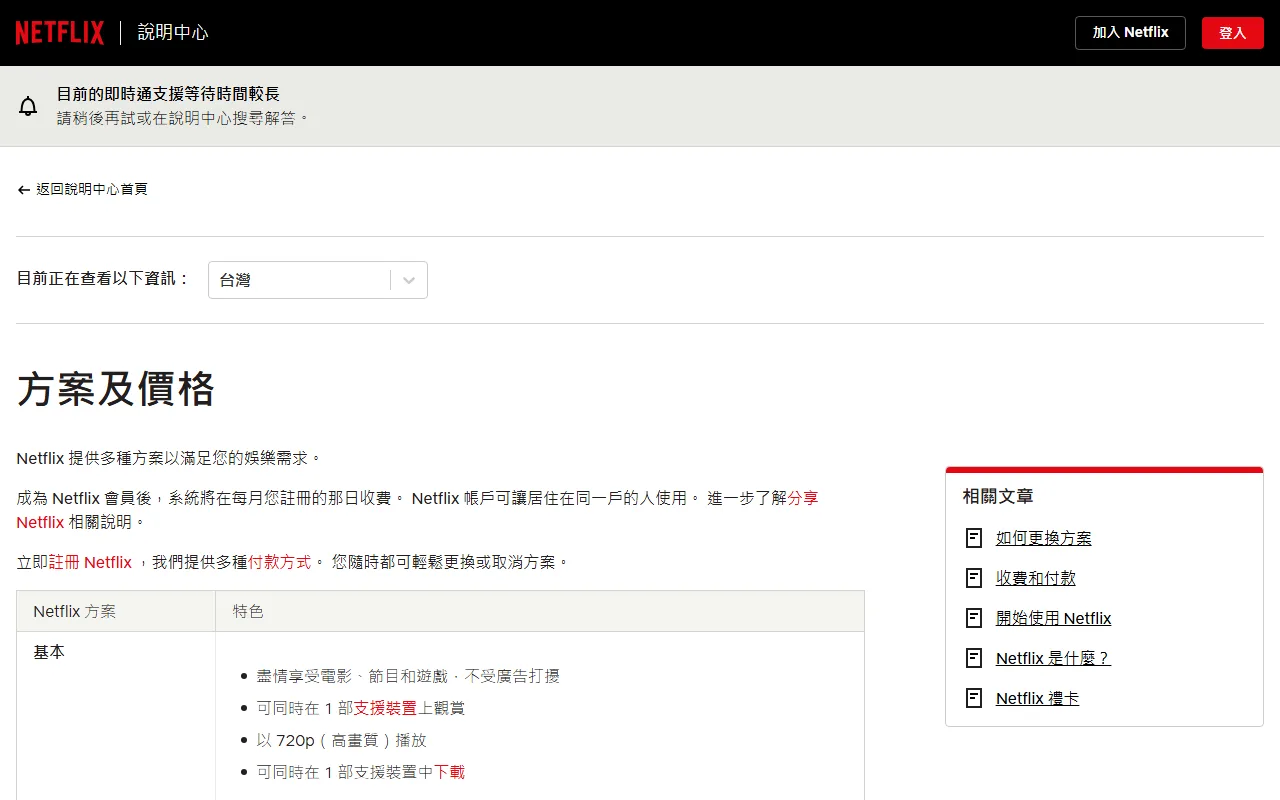
សមាជិកភាព Netflix ជាទូទៅបន្តតាមវដ្តគិតប្រាក់ ប៉ុន្តែវិធីទូទាត់ ពន្ធ និងកញ្ចប់ខុសគ្នាតាមប្រទេស។ សូមចូលគណនី Netflix ទៅផ្នែកគ្រប់គ្រងព័ត៌មានទូទាត់ រួចពិនិត្យលេខកាត ថ្ងៃផុតកំណត់ លេខសុវត្ថិភាព ព័ត៌មានវិក្កយបត្រ និងរូបិយប័ណ្ណ។
ការផ្ទៀងផ្ទាត់ពេលភ្ជាប់កាតលើកដំបូង
- ចូលផ្នែកគ្រប់គ្រងព័ត៌មានទូទាត់ ចេញពីគណនី Netflix ដោយផ្ទាល់។
- បំពេញព័ត៌មានវិក្កយបត្រឱ្យត្រូវនឹងកំណត់ត្រារបស់អ្នកចេញកាត។
- បំពេញការផ្ទៀងផ្ទាត់ 3DS ឬការអនុម័តក្នុងកម្មវិធីអ្នកចេញកាត ហើយកុំបិទទំព័របញ្ជូនបន្ត។
- ត្រឡប់មកគណនីវិញ រួចពិនិត្យលេខ 4 ខ្ទង់ចុងក្រោយ និងថ្ងៃគិតប្រាក់បន្ទាប់។
- នៅក្នុងកម្មវិធីអ្នកចេញកាត មើលថាវាជាការអនុញ្ញាតផ្ទៀងផ្ទាត់ ការកាត់ប្រាក់ពិត ឬការអនុញ្ញាតដែលបានបង្វិលវិញ។
- រក្សាទុកបង្កាន់ដៃ Netflix និងលេខប្រតិបត្តិការ។
បើអ្នកបង់ថ្លៃ Netflix តាមក្រុមហ៊ុនទូរគមនាគមន៍ អ៊ីនធឺណិត ឬកញ្ចប់រួម អ្នកប្រហែលមិនអាចប្តូរកាតឬសុំសងប្រាក់ក្នុងគណនី Netflix ទេ។ ត្រូវគ្រប់គ្រងនៅឯដៃគូនោះវិញ។ ការលុបកម្មវិធី Netflix ចេញ មិនមែនជាការបោះបង់សមាជិកភាពទេ។
ChatGPT៖ គេហទំព័រ, iOS និង Android ជាបីផ្លូវផ្សេងគ្នា
មេរៀនផ្លូវការរបស់ OpenAI បច្ចុប្បន្នបញ្ជាក់ថា ការជាវតាមគេហទំព័រអាចគ្រប់គ្រងក្នុងការកំណត់ផ្នែកវិក្កយបត្រនិងការទូទាត់ ហើយបោះបង់បានតាមផ្នែកវិក្កយបត្រ រួចជ្រើសបោះបង់កញ្ចប់។ ឈ្មោះម៉ឺនុយអាចខុសបន្តិចបន្តួចតាមកញ្ចប់និងការធ្វើបច្ចុប្បន្នភាពអេក្រង់។
បើអ្នកជាវតាម iOS ត្រូវគ្រប់គ្រងក្នុងផ្នែកការជាវរបស់ Apple ហើយបើជាវតាម Android ត្រូវគ្រប់គ្រងក្នុង Google Play។ កុំរកការជាវរបស់ App Store នៅក្នុងទំព័រវិក្កយបត្ររបស់ ChatGPT ហើយកុំទិញថ្មីតាមច្រកផ្សេង មុនពេលរកការជាវដើមឱ្យឃើញ។
ចំណុចដែល OpenAI ណែនាំឱ្យពិនិត្យ ពេលកាតត្រូវបដិសេធ
- លេខកាត ថ្ងៃផុតកំណត់ លេខ CVC និងអាសយដ្ឋានវិក្កយបត្ររួមទាំងលេខកូដប្រៃសណីយ៍ ត្រឹមត្រូវ។
- សមតុល្យគ្រប់គ្រាន់ ហើយកាតអនុញ្ញាតការទូទាត់អនឡាញ អន្តរជាតិ និងការកាត់ដដែលៗ។
- អនុញ្ញាតឱ្យបង្អួចលេចឡើងឬការបញ្ជូនបន្ត ហើយបានបំពេញការផ្ទៀងផ្ទាត់ 3DS។
- ប្រទេសរបស់អ្នកប្រើ និងតំបន់ចេញកាត សុទ្ធតែស្ថិតក្នុងបញ្ជីគាំទ្រ។
- អ្នកចេញកាតមិនបានរារាំងដោយសារហានិភ័យក្លែងបន្លំ ឬប្រភេទហាង។
- ឃ្លាំងសម្ងាត់ ខូគី កម្មវិធីទប់ស្កាត់ការផ្សាយពាណិជ្ជកម្ម ឬ VPN មិនរារាំងដំណើរការផ្ទៀងផ្ទាត់។
OpenAI ជាទូទៅមិនទទួលបានមូលហេតុលម្អិតនៃការបដិសេធពីធនាគារទេ។ បើព័ត៌មានត្រឹមត្រូវហើយនៅតែបរាជ័យ ត្រូវសួរអ្នកចេញកាតផ្ទាល់។ កុំប្រើតំបន់ក្លែងក្លាយ និងកុំជឿថាការប្តូរកាតមួយទៀតនឹងជោគជ័យជានិច្ច។
បើអ្នកចង់ប្តូរទៅរូបិយប័ណ្ណថ្មី មេរៀនរបស់ OpenAI អំពីរូបិយប័ណ្ណច្រើនបញ្ជាក់ថា អ្នកអាចត្រូវបោះបង់ការជាវតាមគេហទំព័រចាស់សិន រួចជាវឡើងវិញក្រោយវដ្តបច្ចុប្បន្នចប់។ កុំសន្មត់ថាអាចប្តូររូបិយប័ណ្ណនៅក្នុងការជាវដដែលបានទេ។
App Store៖ បោះបង់ ប្តូរកាត និងលុបកម្មវិធី ជារឿងផ្សេងគ្នា
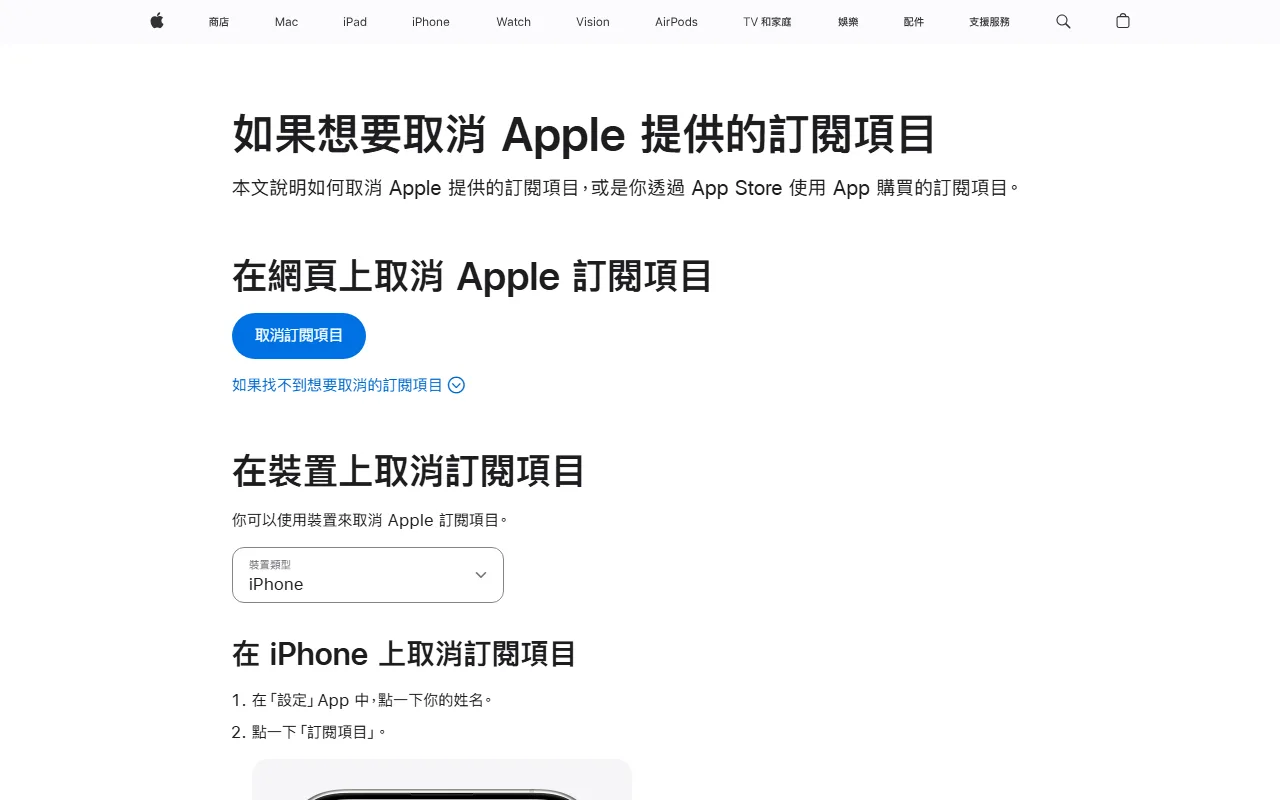
ដំណើរការផ្លូវការរបស់ Apple នៅលើ iPhone ឬ iPad៖ បើកការកំណត់ ចុចលើឈ្មោះអ្នក ចូលផ្នែកការជាវ ជ្រើសសេវា រួចបោះបង់។ បើគ្មានប៊ូតុងបោះបង់ ឬឃើញសារបង្ហាញថ្ងៃផុតកំណត់ នោះអ្នកប្រហែលបានបោះបង់រួចហើយ ប៉ុន្តែត្រូវរក្សាទុករូបថតអេក្រង់និងថ្ងៃផុតកំណត់។
ការប្តូរវិធីទូទាត់ស្ថិតនៅក្នុងការកំណត់ការទូទាត់នៃគណនី Apple ហើយអ្នកត្រូវពិនិត្យសមតុល្យដែលនៅជំពាក់ ការចែករំលែកក្នុងគ្រួសារ និងការកំហិតតាមប្រទេស។ ការលុបកម្មវិធីមិនបោះបង់ការជាវទេ ហើយការដកកាតចេញពី Apple Wallet ក៏មិនមែនជាការដកវិធីទូទាត់ចេញពី App Store ដែរ។
បើ Apple ជាអ្នកគិតប្រាក់ បង្កាន់ដៃនិងដំណើរការសុំសងប្រាក់វិញ ត្រូវរកក្នុងប្រវត្តិការទិញឬផ្នែកជំនួយរបស់ Apple មិនមែនស្នើទៅអ្នកអភិវឌ្ឍន៍កម្មវិធី ឬវេទិកាកាតទេ។
Google Play៖ ត្រូវចូលគណនី Google ឱ្យត្រូវ
ដំណើរការផ្លូវការ៖ ចូលផ្នែកការទូទាត់និងការជាវ ជ្រើសផ្នែកការជាវ រួចជ្រើសសេវា។ ការប្តូរកាតធ្វើតាមផ្នែកគ្រប់គ្រង ហើយការបោះបង់ធ្វើតាមប៊ូតុងបោះបង់ការជាវ។ ការលុបកម្មវិធីចេញមិនបញ្ឈប់ការបន្តជាវទេ។
Google Play អនុញ្ញាតឱ្យកំណត់វិធីទូទាត់បម្រុង។ វាកាត់បន្ថយការដាច់សេវា ប៉ុន្តែក៏មានន័យថា បើកាតចម្បងបរាជ័យ កាតបម្រុងនឹងត្រូវកាត់ជំនួស។ មុនបើកមុខងារនេះ សូមដឹងច្បាស់ថាការជាវណាអាចប្រើកាតណា ហើយបើកការជូនដំណឹងដើម្បីកុំច្រឡំវាជាការក្លែងបន្លំ។
បើរកការជាវមិនឃើញ សូមប្តូរគណនី Google ហើយមើលបង្កាន់ដៃដើម។ មូលហេតុញឹកញាប់បំផុតគឺចូលខុសគណនី មិនមែនកាតបរាជ័យទេ។
ការអនុញ្ញាត ការកាត់ពិត និងការកាត់ស្ទួន
| ស្ថានភាព | អាចមានន័យថា | អ្វីដែលត្រូវធ្វើ |
|---|---|---|
| ការអនុញ្ញាតចំនួនតូចឬសូន្យ កំពុងរង់ចាំ | ហាងកំពុងផ្ទៀងផ្ទាត់កាត | កុំព្យាយាមម្តងហើយម្តងទៀត រង់ចាំវាបង្វិលវិញឬក្លាយជាការកាត់ពិត |
| កាត់ហើយ | ការកាត់ចូលរបាយការណ៍ | ផ្ទៀងផ្ទាត់បង្កាន់ដៃនិងស្ថានភាពសេវា |
| បង្វិលវិញឬលុបចោល | ការអនុញ្ញាតត្រូវលុប | រក្សាកំណត់ត្រា រង់ចាំអ្នកចេញកាតដោះលែងដែនកំណត់ |
| ការរង់ចាំចំនួនដូចគ្នាច្រើន | អាចមកពីការព្យាយាមច្រើនដង | ឈប់ដាក់ស្នើ សួរហាងឬអ្នកចេញកាត |
| ការកាត់ពិតចំនួនដូចគ្នាច្រើន | អាចជាការជាវឬការកាត់ស្ទួន | រកច្រក គណនី និងបង្កាន់ដៃ រួចបើកសំណុំរឿង |
| ឈ្មោះហាងមិនស្គាល់ | អាចជាឈ្មោះក្រុមហ៊ុនមេឬធនាគារទទួល | ពិនិត្យបង្កាន់ដៃ។ បើនៅតែមិនដឹង ត្រូវបង្កកកាតនិងទាក់ទងអ្នកចេញកាត |
ចំនួននៃការអនុញ្ញាតជាមុន និងរយៈពេលដោះលែង គ្មានលេខថេរសម្រាប់គ្រប់វេទិកាទេ។ កុំរាប់ការរង់ចាំជាថ្លៃសេវាអចិន្ត្រៃយ៍ ហើយកុំប្រើកាតច្រើនក្នុងពេលដែលស្ថានភាពមិនទាន់ច្បាស់។
ពិនិត្យការបដិសេធតាមស្រទាប់
- កាត៖ មិនបង្កក មិនផុតកំណត់ សមតុល្យនិងដែនកំណត់គ្រប់គ្រាន់។
- ព័ត៌មាន៖ លេខកាត ថ្ងៃផុតកំណត់ លេខ CVC ឈ្មោះ អាសយដ្ឋាន និងលេខកូដប្រៃសណីយ៍។
- ការផ្ទៀងផ្ទាត់៖ អនុញ្ញាតបង្អួចលេចឡើងឬការបញ្ជូនបន្ត បំពេញការអនុម័តក្នុងកម្មវិធីធនាគារឬលេខកូដ ហើយកុំផ្ទុកទំព័រឡើងវិញ។
- តំបន់៖ ប្រទេសរបស់សេវា តំបន់គណនី ប្រទេសចេញកាត និងគោលការណ៍ទូទាត់។
- ហាង៖ ការអនុញ្ញាតការកាត់ដដែលៗ ការទូទាត់ឆ្លងដែន និងប្រភេទហាង។
- ច្រកគិតប្រាក់៖ សារអំពីបំណុលឬការព្យាយាមកាត់ឡើងវិញ ពី Netflix, OpenAI, Apple, Google ឬដៃគូ។
- កម្មវិធីរុករក៖ សម្អាតឃ្លាំងសម្ងាត់ ឬប្រើកម្មវិធីផ្លូវការ ផ្ទាំងឯកជន និងបណ្តាញមានស្ថិរភាព រួចព្យាយាមម្តងទៀត។
- អ្នកចេញកាត៖ សួរមូលហេតុនៃការបដិសេធ ស្ថានភាព 3DS និងការរារាំងផ្នែកសុវត្ថិភាព។
ការព្យាយាមឡើងវិញច្រើនដងក្នុងពេលខ្លី អាចបង្កើតការអនុញ្ញាតច្រើន ឬធ្វើឱ្យប្រព័ន្ធគ្រប់គ្រងហានិភ័យតឹងរឹងជាងមុន។ សូមប្តូរលក្ខខណ្ឌម្តងមួយ ហើយកត់សារកំហុសនិងពេលវេលា។
ប្តូរកាតដោយមិនធ្វើឱ្យសេវាដាច់
7 ថ្ងៃមុន
- ចេញពីតារាងកត់ត្រា សូមរាយសេវា ច្រកគិតប្រាក់ ថ្ងៃបន្ត រូបិយប័ណ្ណ និងលេខចុងក្រោយនៃកាតចាស់។
- បើកដំណើរការកាតថ្មី ហើយបើកការទូទាត់អនឡាញ អន្តរជាតិ ការកាត់ដដែលៗ និង 3DS។
- ទុកសមតុល្យឱ្យគ្រប់ ហើយសាកល្បងប្រតិបត្តិការតូចមួយដែលអ្នកត្រូវការពិត។
ថ្ងៃប្តូរ
- ធ្វើបច្ចុប្បន្នភាពពីទំព័រវិក្កយបត្រផ្លូវការ មិនមែនតាមតំណក្នុងអ៊ីមែលទារបំណុល។
- កត់លេខ 4 ខ្ទង់ចុងក្រោយថ្មី ពេលវេលា និងរូបថតអេក្រង់បញ្ជាក់។
- ចំពោះ Apple និង Google ត្រូវពិនិត្យថាជាគណនីនិងការជាវត្រឹមត្រូវ។
ក្រោយវដ្តបន្តបន្ទាប់
- សេវាបង្ហាញថាសកម្ម អ្នកចេញកាតមានការកាត់ត្រឹមត្រូវ និងបង្កាន់ដៃចូលដល់។
- ទុកកាតចាស់រហូតដល់ការសងប្រាក់ ការអនុញ្ញាតជាមុន និងវិក្កយបត្រចាស់ចប់សព្វគ្រប់។
- ទើបបង្កកឬបិទកាតចាស់។ ប៉ុន្តែបើកាតចាស់លេចព័ត៌មាន សុវត្ថិភាពសំខាន់ជាងការបន្តសេវា។
ការប្រើកាតដាច់ដោយឡែកសម្រាប់ការជាវ ធ្វើឱ្យងាយផ្ទៀងផ្ទាត់និងកំណត់ដែនកំណត់ ប៉ុន្តែវាក៏ក្លាយជាចំណុចបរាជ័យតែមួយដែរ។ សេវាសំខាន់ត្រូវមានផ្លូវបម្រុង ហើយអ្នកត្រូវដឹងកន្លែងប្តូរ។
លក្ខណៈវិនិច្ឆ័យថាបានបោះបង់ការជាវពិត
ការបោះបង់មិនមែនជាការលុបកម្មវិធី ដកកាតចេញ ឬទុកសមតុល្យសូន្យទេ។ អ្នកត្រូវ៖
- រកការជាវនៅក្នុងច្រកគិតប្រាក់ដើម។
- បំពេញដំណើរការបោះបង់ផ្លូវការ។
- ឃើញស្ថានភាពបង្ហាញថាបានបោះបង់ គ្មានការបន្ត ឬមានថ្ងៃផុតកំណត់ច្បាស់លាស់។
- រក្សាទុករូបថតអេក្រង់ អ៊ីមែល និងថ្ងៃចូលប្រើចុងក្រោយ។
- ក្រោយថ្ងៃគិតប្រាក់បន្ទាប់ ពិនិត្យថាគ្មានការកាត់ថ្មី។
- បើនៅតែកាត់ សូមយកភស្តុតាងនៃការបោះបង់ទៅវេទិកាគិតប្រាក់និងអ្នកចេញកាត។
សេវាខ្លះនៅតែប្រើបានរហូតដល់ចប់រយៈពេលដែលបានបង់រួច ក្រោយពីបោះបង់។ នេះមិនមែនមានន័យថាការបោះបង់បរាជ័យទេ។ ការបញ្ឈប់ការបន្តជាវ និងការសុំសងប្រាក់ដែលបានបង់រួច ជាពីររឿងផ្សេងគ្នា។
គណនាថ្លៃពិតប្រចាំខែ
ថ្លៃពិតប្រចាំខែ = វិក្កយបត្ររបស់ហាង + ពន្ធ + ថ្លៃទិញនិងបញ្ចូលទុន + គម្លាតពេលបម្លែង + ថ្លៃប្តូររូបិយប័ណ្ណនិងឆ្លងដែន − រង្វាន់ដែលប្រើបានពិត
ឧទាហរណ៍សន្មត់៖ វិក្កយបត្រ 60,000 KHR, ថ្លៃទិញនិងបញ្ចូលទុន 600 KHR, ការបម្លែងនិងអត្រាប្តូរប្រាក់ 1,200 KHR និងរង្វាន់ប្រើបាន 300 KHR។ ថ្លៃពិតគឺ 61,500 KHR។ នេះជារូបមន្តគណនា មិនមែនតម្លៃបច្ចុប្បន្នរបស់សេវាណាមួយទេ។
សូមប្រើរូបមន្តថ្លៃពិតនៃកាតគ្រីបតូ ជាមួយរបាយការណ៍ចុងក្រោយ។ កុំរាប់ការរង់ចាំដែលមិនទាន់ចប់ ជាថ្លៃអចិន្ត្រៃយ៍។
ការពិនិត្យ 5 នាទីប្រចាំខែ
- ច្រកគិតប្រាក់និងគណនីចូលប្រើរបស់ការជាវនីមួយៗច្បាស់លាស់
- ថ្ងៃបន្ត រូបិយប័ណ្ណ ពន្ធ និងលេខ 4 ខ្ទង់ចុងក្រោយ បានធ្វើបច្ចុប្បន្នភាព
- កាតអនុញ្ញាតការកាត់ដដែលៗ ការទូទាត់ឆ្លងដែន និង 3DS
- សមតុល្យមានចន្លោះបន្តិច តែមិនលើសតម្រូវការ
- វិធីទូទាត់បម្រុងនៅ Apple និង Google ត្រូវនឹងអ្វីដែលអ្នកចង់អនុញ្ញាត
- សេវាដែលបានបោះបង់ មានស្ថានភាព អ៊ីមែល និងភស្តុតាងថ្ងៃផុតកំណត់
- ការជូនដំណឹងពីអ្នកចេញកាត និងបង្កាន់ដៃរបស់សេវា ត្រូវគ្នារាល់ការកាត់
- កាតចាស់បិទក្រោយពីការសងប្រាក់និងការអនុញ្ញាតជាមុនចប់
អានបន្ថែម៖ សុវត្ថិភាពកាតនិម្មិត និងការកាត់ប្រាក់ដោយគ្មានការអនុញ្ញាត, ការភ្ជាប់ Apple Pay និង Google Wallet។ ឯកសារផ្លូវការ៖ វិក្កយបត្រ Netflix, ករណីកាតត្រូវបដិសេធនៅ OpenAI, ការបោះបង់ ChatGPT, ការបោះបង់ការជាវរបស់ Apple និងការគ្រប់គ្រងការជាវក្នុង Google Play។
អត្ថបទនេះមិនធានាថាកាតនិម្មិតណាមួយនឹងត្រូវហាងទទួលទេ។ លទ្ធផលត្រូវយោងតាមហាង វេទិកាគិតប្រាក់ និងការអនុញ្ញាតពិតរបស់អ្នកចេញកាត។